The complete feature list, every tool that turns your off-duty, extra duty and secondary employment work into clean, accountant-ready records. Denver officers have a free plan. Everyone else starts with 30 days free, then $59.99 a year, or $7.99 a month on the website.
Centurion Blue is on iPhone and Android now, and still works in any browser on your phone or your desktop.
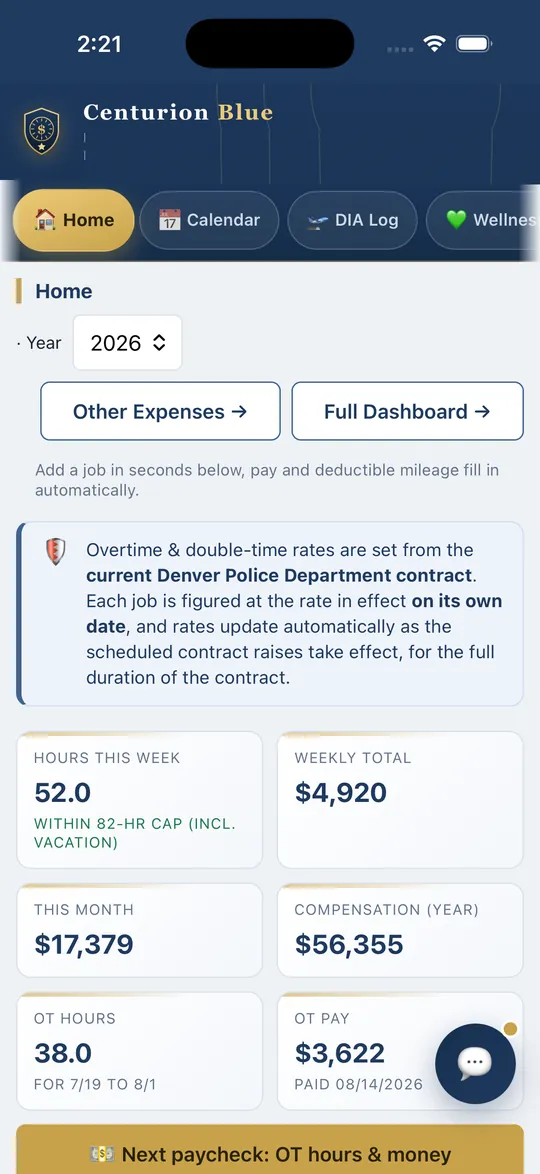
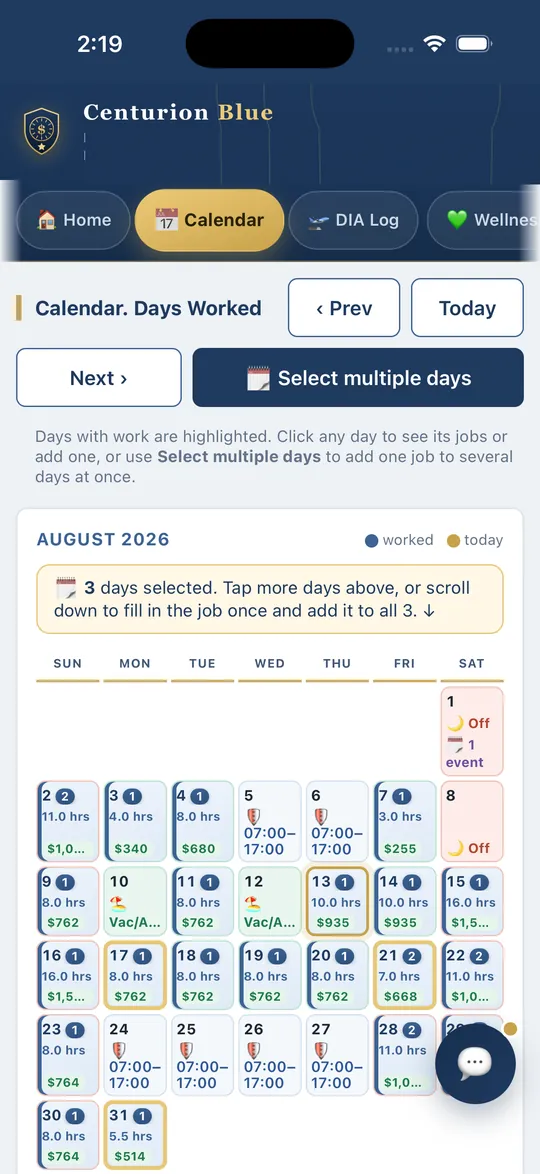
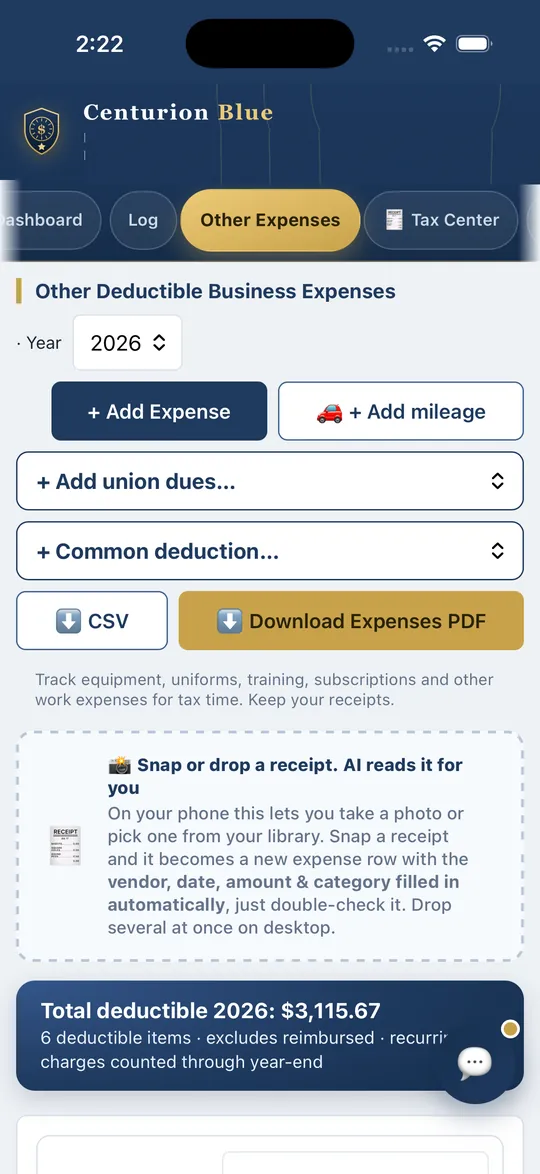
Home: your week, month and overtime at a glance (sample data)Calendar: hours and pay on every day worked (sample data)Other Expenses: snap a receipt and it becomes an expense row (sample data)
Log jobs in seconds
30-second job entryPick a date, type the employer, enter shift times, pay fills in automatically.
Shift times to hoursEnter 24-hr times (e.g., 0900 to 1730); hours calculate themselves, overnight shifts too.
Auto-fill & duplicateSaved businesses and addresses autocomplete; copy a recurring job to a new date in one tap.
Every pay type1099, Check Only (Non-1099), Direct Employer (W-2), Department Paid Overtime, Department Double Time, Call Back and Court Time.
Add a job to many daysTap days on the calendar, add a date range (any weekdays), or repeat a job, enter it once and it's logged on all of them.
Edit a whole entry at onceChange or delete every day of a multi-day job in a single step.
Your pay, calculated for you
Pay scale built inDenver edition: pick your rank & years and your base rate loads automatically. Other departments: enter your hourly rate once, and overtime and double time are figured from it.
Overtime & double timeOT (×1.5) and double time (×2.0) figured from your base pay, just enter the hours.
25-year detective rateDenver edition: selectable on department overtime jobs that pay the detective rate.
Pay-scale updates includedDenver edition: rates are refreshed at every contract raise, included in your subscription.
OT on your next paycheckDenver edition: Home shows the department overtime and double time hours landing on each upcoming exceptions pay date, and what they come to. Tap for the job-by-job breakdown, with every check date from the city's 2026 to 2029 schedules.
Bank overtime as comp timeTake a department overtime or double time job as comp time and the hours go into your comp bank at your overtime rate instead of your paycheck, so four hours at time and a half bank six. Decide on each job, or set it to always bank.
Taxes & expenses, organized
Mileage at the IRS rateOn 1099 jobs the app measures the drive and values it at the IRS rate in force that day, tracked separately from pay. Record keeping only.
Mileage deduction rulesYou choose the rule in Settings, Mileage deduction rules: with a qualified home office the round trip from home counts; without one, the drive from home is left out and a job you drive to straight from your station counts one way. Ask a tax professional which applies to you.
Work expense trackerUniforms, gear, weapons & ammo, training, phone, with recurring charges, business-use %, and totals by category.
📸 AI reads your receiptsSnap a receipt on your phone and AI fills in the vendor, date, amount & category automatically, it becomes a logged expense and prints with your reports. Just double-check it.
Business mileage (non-commute)Log work miles that aren't a commute to a 1099 job, valued at the IRS rate.
Union-dues & quick-addsOne-click DPPA & FOP dues (monthly or yearly) plus common expenses like POST, range, and duty gear.
Accountant-ready tax reportIncome by category (1099 vs W-2), mileage at the IRS rate, quarterly breakdown, and totals by employer.
“No 1099 expected”A payer that paid you less than $2,000 in the year ($600 before 2026) does not have to send a 1099, so the app shows “No 1099 expected” instead of waiting on a form. The income is still taxable. Mark forms received in the W-2 Tracker at the bottom of the Log tab.
One-click PDF & CSVExport everything for your accountant or your own records at tax time.
Totals by job & categorySee what each employer paid and what each expense category adds up to for the year.
The Tax Center
🧾 Your whole householdFiling status, spouse & kids, childcare, 529, HSA & IRA, credits estimated for you. This household section never asks for or stores a Social Security number.
All 50 statesYour state is set from your location, or pick it yourself, and the estimate uses that state's planning rate, which you can edit.
Know what to set asideA per-dollar set-aside estimate from your actual jobs, with quarterly amounts or the extra withholding that would cover it, as an estimate, so you can plan for April.
The accountant packetOne tap prints the year: income, mileage, household, dependents, every receipt & W-2 attached.
Medical & HSA vaultStore medical receipts apart from your work expenses, with a 7.5%-of-income itemizing check to raise with your tax preparer.
Retirement planner (Premium)
Try retirement datesMove a slider to see how your retirement age changes your pension, with key dates worked out from your Date of Hire and birth month and year. An estimate, not advice. On the website now; the phone apps get it with their next update.
Compare scenariosSave up to three scenarios and see them side by side.
Denver pension toolsDenver edition: payment options, a DROP planner, cost of living and lump sum math, refund math, a paystub check for the 12% pension deduction, and a plain-language plan guide.
Savings pace and growthSee your 457, 403(b) or 401(k) pace against the yearly limit and try a few returns.
Off-duty income and Social SecuritySee how much your 1099 income could put into a Solo 401(k) or SEP, and count Social Security credits.
Balances and a checklistType your balances and keep yearly review dates. Nothing connects to any account.
Schedule & get paid
Get-paid remindersAn unpaid-jobs list shows who still owes you and the total, mark paid when you collect.
Calendar of days workedHours and pay on every day at a glance, month by month.
Tap a day, see everythingAny day pops up as swipeable full-detail cards, every job, your regular shift hours on top, one card at a time.
Personal events, optionalAdd appointments, dinners, family events. They show on the calendar, in the day pop-up, and on your Home screen next to your jobs.
GPS check-in on scheduler jobsWhen your scheduler turns it on, check in and out with one tap, geo-stamped, no more “I'm here” texts.
Take part of a shiftOn split-enabled jobs, grab just the hours you can work, the rest goes back on the board automatically.
Days off & vacationMark your days off and vacation days, they show right on the calendar.
Per-day & weekly shift changesSet different hours for one day, or for a weekday across a date range, for a temporary assignment.
One-tap Add to CalendarSend any job to Apple, Google, or Outlook, or add all upcoming jobs at once, with a reminder alert.
Job reminders & notificationsAn in-app banner and optional device notifications ahead of an upcoming job.
TeleStaff trackingMark whether each job is entered in TeleStaff and see what's still pending. (Denver)
Dashboard & totalsBy job type, hours per week, monthly running pay, and a multi-year summary.
Weekly hours trackerKeep an eye on your weekly hours and secondary-employment cap.
Your leave banksVacation, comp and sick hours accruing forward from the balance you enter, on both editions: the DPD contract rates and caps in Denver, your own accrual rates anywhere else. Denver officers can fill them from a TeleStaff accrual report.
Denver: Wellness & DIA
Wellness Rewards portalLog every activity the program pays points for and watch the running total against each yearly maximum.
Photograph the receiptSnap the proof the day you earn it and it attaches to the right activity, no filing later.
Tally Sheet as one PDFYour quarterly sheet prints with every proof behind it, named the way the department asks and ready to sign and email to Wellness.
Workouts from your watchSessions you record on Apple Watch or your Android phone are picked up ready to add to the gym log, so you never retype one.
APFT score sheetPrints laid out to match the fitness test form used at the Academy.
DIA daily activity logLog each action as it happens and produce a PDF laid out to match the DPD 120DIA-1 you already file.
Import your accrual reportUpload the TeleStaff Officer Accrual Report and your opening balances fill themselves in.
Add-on: Fitness & Diet Coaching
A weekly plan you can keepPick a goal and get a weekly training and nutrition template, then check off each piece as you do it.
Food search, meal by mealLog what you eat against a daily calorie and macro target the plan works out from your starting point.
$39.99 a year, either editionA separate add-on for Denver and nationwide officers, bought on the website. It is not part of Premium, and it is general guidance, not personalized medical or nutrition advice.
Anywhere, private, supported
Phone & computer, syncedOne account, your data follows you on every device you sign in on.
Installs like an appAdd it to your home screen for a one-tap icon; it even works offline.
On the App Store and Google PlayNative apps for iPhone, iPad and Android, signed in as you and synced with the browser version.
Money & deadline alertsIn the phone apps: a nudge when jobs go unpaid, when your week nears its hour cap, before quarterly tax dates, and the evening before a payday.
Quiet hours, your timesPick when daily reminders arrive and set quiet hours; alerts wait until they end. Time-to-leave always comes through.
Every widget, its own jobLong-press any home-screen widget to pick what it shows, week, month, unpaid, cap, a live countdown, and which jobs it counts.
On the Lock ScreeniPhone Lock Screen widgets show your week, unpaid total or a countdown to your next job without unlocking.
Ask SiriOn iPhone, add a job, check this week's pay or ask what you have coming up, without opening the app.
App LockIn the phone apps, lock Centurion Blue behind Face ID or Touch ID on iPhone, or fingerprint or face unlock on Android.
Military or 12-hour timeShow times as 24-hour military or 12-hour AM/PM, your choice.
Private & secureYour job log, pay, expenses and tax records stay in your own account. Nothing is shared with your department.
Two-factor sign-in (2FA)Optional: add a 6-digit authenticator code to your sign-in, included for every member at no extra cost.
Personalized supportNew members get a welcome by text and email. Text (303) 802-0272 or email support@centurionblue.com and a person answers. The chat bubble is an automated assistant.
Denver Job Exchange
Post & fill open jobsPost a job that needs covered to the Denver Exchange and let other officers grab it.
Grab open shiftsPick up open off-duty jobs other officers or your scheduler posted, in one tap.
Officers-needed & open hoursPosts can need several officers and let each log their own start/end time.
Accept syncs to your calendarAccepting a job adds it to your schedule (and tracked pay for Premium).
Can't work it? ReleaseSend a job you accepted back to the board so someone else can take it.
New-jobs badgeThe Exchange tab flags new openings you haven't seen yet.
Denver Police Marketplace
Members-only boardNot a public site. A Denver badge number to join, every listing reviewed before it goes live, and listings show only to signed-in members.
Buy, sell & supportFor Sale (with photos), Fundraisers, Challenge Coins, Services, Vehicles, Housing, and Shout-Outs.
Self-service postingPost it yourself with up to 4 photos. Approved posts get a private removal code, so you take it down in seconds when it sells.
New listings every weekMembers get the week's new listings by email, with an unsubscribe link in every one.
For schedulers
Standing job librarySave reusable jobs (pay, location, hours, custom fields) and schedule dates from them.
Roster & department directoryBuild your roster and add officers fast from the full department directory.
Schedule-dates wizardPick days and slots, set the time and officer per slot, and post openings, repeat weekly if you like.
Assign or let officers grabAssign from your roster, or push open dates to the Exchange.
Permanent officerLock one officer onto every date of a job.
Side-deals & releasesLet assigned officers hand off or release shifts, with or without your approval.
Cancel a dateCancel a date with a reason; officers are notified and it drops off the schedule.
Roster messagingPost a message to your whole roster; officers see it in the app.
Client job-request linksGive each client their own private link and they send you job requests themselves, with no login and no account. Requests wait in your portal to approve and schedule, decline, or send back for more detail.
Phone alertsGet a real phone notification when an officer grabs, swaps, or releases a shift.
GPS check-in & distance flagsOptional per job: officers check in and out geo-stamped, your board updates live, with “at the site” verification or the distance if the pin lands elsewhere.
No-show alertsAn automatic app notification if an assigned officer hasn't checked in 15 minutes after start.
Split shiftsYour call per job: an officer takes part of an open shift and the rest relists on the board by itself.
Employer coverage linkA private live calendar for the employer, dates, times, officers, on-site check-ins. No login, no pay shown, revoke anytime.
Printable officer calendarA clean PDF to send the client or post at the site: shift times and every officer's full name, with no badge numbers or pay. Pick the entire event, a day, a week, a month, a quarter or your own dates, and it lays itself out as a big-type day sheet, a week board or a month calendar.
Print reportsSchedule PDF, job summary (pay by officer) and officer contacts, for the same day, week, month, quarter, year or custom range.
Contract, invoicing & W-9
Secondary Employment ContractThe official contract prefills from each job, downloads ready for signature, and opens the email to the Secondary Employment Unit. Renewals are flagged before the Dec 15 deadline. (Denver)
Monthly Detail to the employerBuild a job's month of dates, hours and officers, review it, then one tap downloads the PDF and opens the email to the employer.
Per-job invoicesBuild an invoice (hours × rate by officer) and export a clean, professional PDF.
DPD 200 & scheduling feeThe DPD 200 template plus your scheduling fee per job (flat, per hour, or per officer hour), ready for the employer. (Denver)
Quarterly invoice trackingEvery quarterly due date for the Secondary Employment Invoice Inbox, tracked in one place. (Denver)
W-9 on fileOfficers keep a signed W-9 on file, generated from the official IRS form. The saved PDF contains the SSN or EIN you enter on it.
Download shared W-9sSchedulers pull the W-9 of a roster officer who shares it with them, no more chasing paperwork.
Bulk W-9 bundleDownload every shared W-9 for a job as one merged PDF.
Auto-mileage & maps
Address autocompleteStart typing a venue or address and pick from suggestions.
Automatic mileageOn 1099 jobs the driving miles to the job address fill in automatically (editable), counted under the mileage rule you chose in Settings.
1099 mileage, separatedMileage is tracked on 1099 jobs only, apart from pay, and valued at the IRS rate for each job's date.
Calendar sync & alerts
The whole job on the eventSynced events carry the job type, shift times, hours, pay, rate, mileage and your notes, in Apple, Google or Outlook.
Time to leave, on your calendarOptional second alert timed to live traffic for that day's drive, so your calendar warns you when to head out.
Auto-syncing calendar feedSubscribe once and your jobs and scheduled shifts, plus your personal events if you turn them on, keep syncing to Apple, Google, or Outlook.
One-tap add to calendarSend any single job to your calendar with a reminder.
Job remindersIn-app and optional device reminders ahead of an upcoming job.
See your co-workersOn scheduler jobs, see which officers you're working with.
Denver officers have a free plan. Everyone else starts with 30 days free.
Denver: the Primary plan is $0 with no card, and you can try Premium free for 30 days when you choose. Every other department: a 30-day free trial starts when you register, no card needed. Premium is then $59.99 a year or $7.99 a month.