For new officers

Starting off-duty work? Keep these records.

What to write down from your first off-duty, extra duty or detail job, a checklist for your first year, and where the app does the keeping for you. Information only.

From the first job

What to write down every time

Off-duty, extra duty, detail, side job, secondary employment: whatever your department calls it, the records are the same. Start with job one, because rebuilding a year from memory in March is hard.

The job itself

The date, the start and end time, the hours, and where you worked. Times matter later for hour limits and for telling two jobs apart.

Who paid you

The business or person that pays, which is not always the place you stood. That name is what shows up on a tax form later.

The rate and the total

The hourly rate you agreed to and what the job should come to, so you can check the payment against it.

How it is paid

As a contractor on a 1099, by check with no form, as a W-2 employee of the business, or as overtime through your own department. They are taxed and reported differently, so note which one each job is.

Whether you were paid

The date the money arrived, and the amount. An unpaid job from four months ago is easy to forget and awkward to chase without a record.

Miles and costs

The drive for contract jobs, and what you spent on the work: uniforms, gear, training and the like. Keep the receipt with the entry.

First-year checklist

Twelve months, in order

General information, not advice. Your department's policy and a tax professional have the final word on what applies to you.

  • Before the first job: read your department's secondary employment policy. Know the approval steps, the weekly hour limit and any rule about rest between shifts.
  • Before the first job: keep a copy of any approval or permit your department requires.
  • When a business asks for a W-9: keep a copy of what you gave them and note the date.
  • Every job: log it the same day, with the items above.
  • Every payday: mark what was paid and look at what is still owed.
  • Every purchase for the work: photograph the receipt the day you buy it.
  • Early on: ask a tax professional how contract income is taxed for you. No tax is withheld from 1099 pay, and estimated payments during the year may apply.
  • Early on: ask the same person which mileage rule fits your situation, then record your miles that way all year.
  • Each quarter: look at your contract income so far and what you have set aside.
  • January and February: check that each tax form arrives. A payer does not have to send a 1099 if it paid you less than $2,000 in the year ($600 before 2026). The income is still taxable.
  • Tax time: hand your preparer one report of income, mileage and expenses, with the forms.
  • After filing: keep the year's records together. Ask your preparer how long to hold them.
Where the app helps

The same list, kept for you

You can do all of the above on paper or in a spreadsheet. Centurion Blue is built to make it a habit that takes seconds.
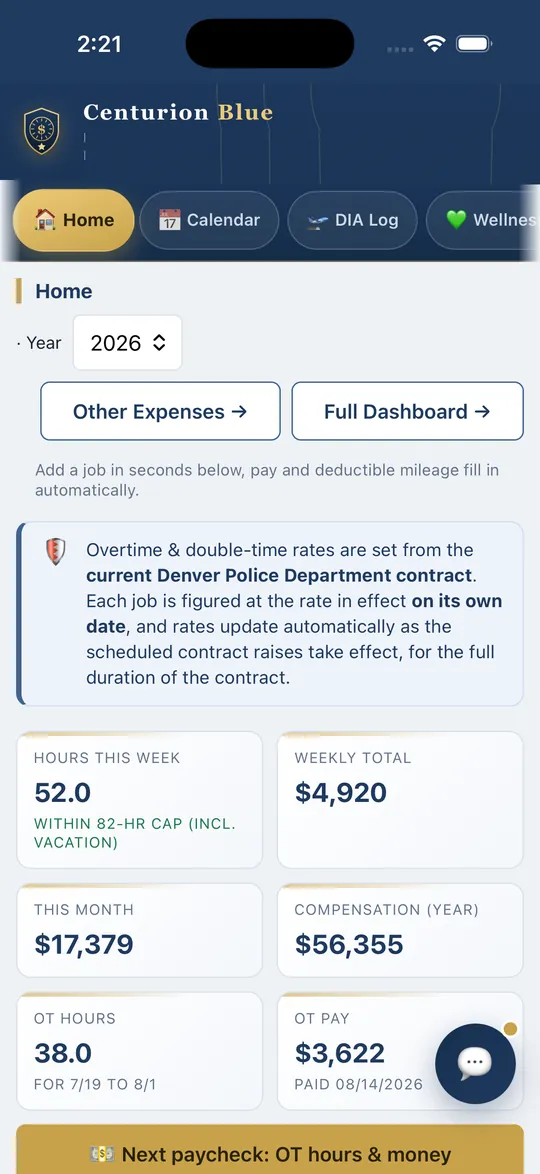
Centurion Blue Home tab on a phone, showing tiles for hours this week, weekly total, this month and overtime pay

Logging a job. Quick Add on the Home tab takes the date, employer, times and job type. Pay and hours are figured as you type. Denver officers get rates from the Denver pay scale; everywhere else you enter your own rate once in Settings.

Getting paid. Each job is marked paid, unpaid or partly paid, and the unpaid ones are listed with a total.

Mileage. On 1099 jobs the app measures the drive and values it at the IRS rate in force that day. You choose the rule in Settings, Mileage deduction rules. Record keeping only; ask a tax professional which rule applies to you.

Expenses and receipts. The Other Expenses tab holds each cost by category with a photo of the receipt.

Hours. A weekly hours cap you set, and a warning before a job takes you over it.

Tax forms. The W-2 Tracker at the bottom of the Log tab is where you mark each form received. A small payer under the 1099 threshold shows "No 1099 expected".

Year end. The Tax Center shows estimates during the year, and Year End Tax Reports builds the PDF for your preparer. The job log and the expense list also export as CSV.

These tools are part of Premium. Denver officers can also open the free Primary plan for the Job Exchange and calendar and start a 30-day Premium trial when they choose. Officers at every other department start with a 30-day trial, then $59.99 a year or $7.99 a month. See every feature, or compare it with a spreadsheet.

Information only, not tax, legal or policy advice. Centurion Blue is not affiliated with, authorized or endorsed by any police department. Your department's own rules on secondary employment always come first.

Keep your own record.

Denver officers can open a free Primary account. Officers at every other department start with a 30-day free trial, no card required, then $59.99 a year or $7.99 a month.

info@centurionblue.com

Text support: (303) 802-0272 (text only)