For officers outside Denver★ 30 days freeDesigned by police officers, for police officers
Off-duty and extra duty pay tracking, at any department.
The nationwide edition of Centurion Blue is a pay tracker for officers outside Denver. Log each off-duty job, extra duty detail, side job or other secondary employment shift, along with your overtime and mileage, let the app do the math, and hand a clean report to your accountant at tax time. Your account is yours alone, and nothing is ever shared with your department.
Free 30-day trial · no card required · then $59.99/year, or $7.99/month on the website · cancel anytime.
Now available
Centurion Blue is on iPhone and Android now, and still works in any browser on your phone or your desktop.
Log a job in under 30 secondsPay & mileage figured for youPDF & CSV reports for tax timePrivate: your data stays yours
What it is
One home for all your off-duty and secondary employment income
Off-duty security jobs, extra duty details, overtime shifts, contract gigs. Whatever your department calls it, Centurion Blue keeps it all in one place and does the math for you. Your pay, your hours, your 1099 job mileage at the IRS rate, and your job-related expenses (uniforms, gear, weapons, training and more) are recorded and roll up into year-end reports you can hand straight to your accountant.
Who it fits: city police officers, sheriff's deputies, state troopers, and campus and transit police at any department outside Denver. Denver officers have their own edition.
Features
Everything an officer needs to track off-duty jobs and extra duty details
Jobs, overtime, mileage, expenses and receipts, tracked and totaled for you.
Pick a date, type the employer, enter your shift times, pay and hours calculate instantly.
Set your rate once
Enter your regular hourly rate one time in Settings and department overtime figures from it. On an off-duty or extra duty job, enter the hourly rate that job pays. When you get a raise, add it in Settings under Pay raises with the date it started, so earlier jobs keep the rate they were paid. Pay raises is on the website now and reaches the phone apps with their next update. Until then a phone app prices every department job at the rate before your first raise, so check those totals on the website.
Overtime & double time
Overtime (×1.5) and double time (×2.0) calculate from your rate, just enter the hours and the math is done.
Mileage at the IRS rate
On 1099 jobs the app measures the drive and values it at the IRS rate in force that day, counted by the rule you choose in Settings, Mileage deduction rules. Tracked separately from pay. Record keeping only; ask a tax professional which rule applies to you.
Track every work expense
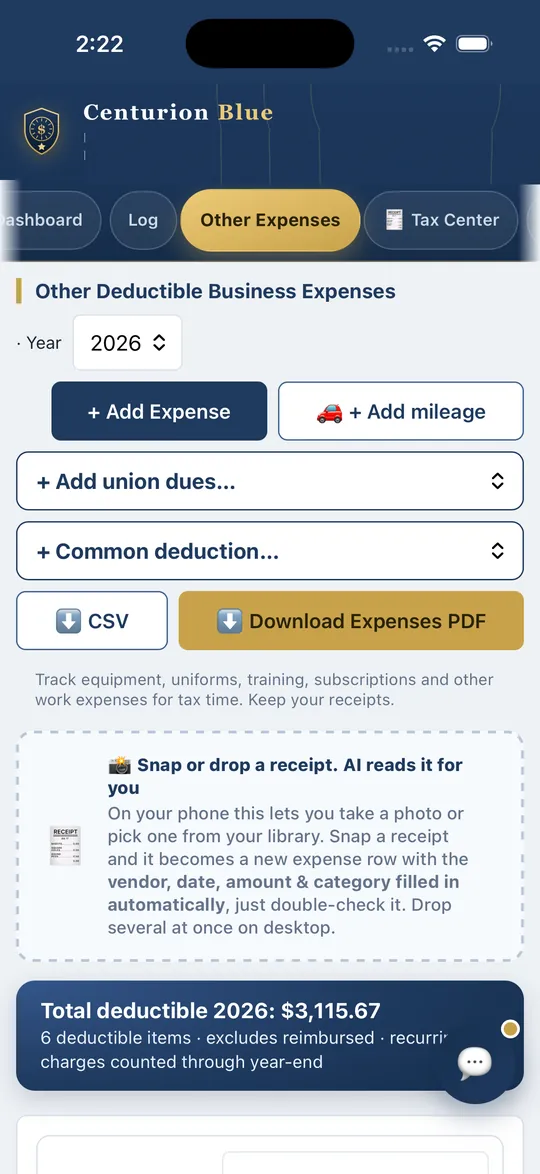
Uniforms, gear, weapons & ammo, training, phone, recurring charges and totals by category, ready for your tax preparer.
Get-paid reminders
An unpaid-jobs list shows who still owes you and the total. Mark paid when you collect.
Calendar & dashboard
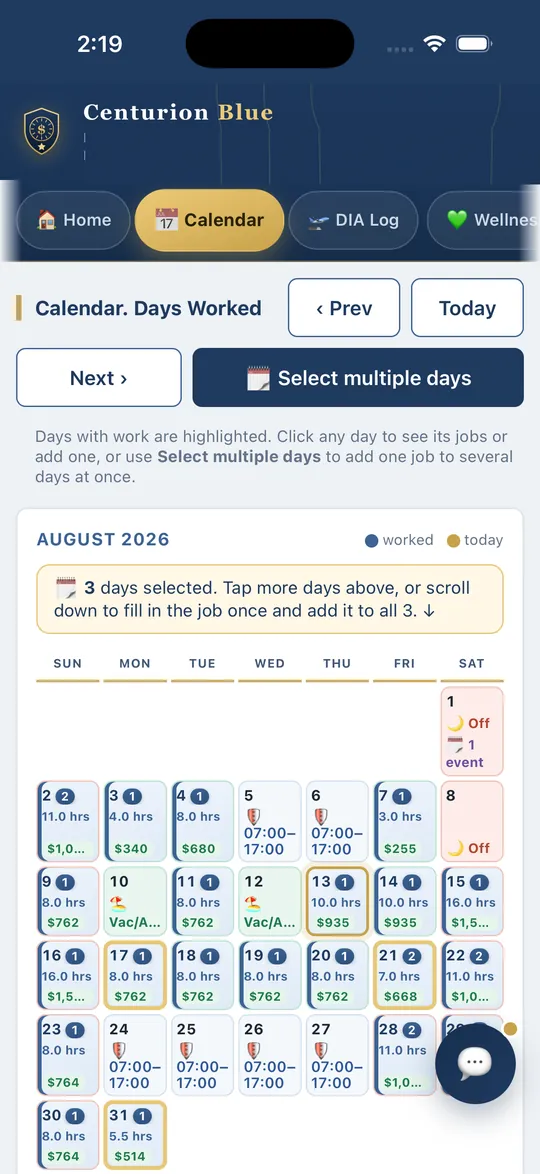
See hours, shift times and pay by day, hours per week, monthly running pay, and multi-year totals.
Add a job to many days
Tap days on the calendar, pick a date range, or repeat a job, enter it once for all of them, then edit the whole entry at once.
Snap or drag in receipts
Photograph a receipt on your phone or drag one in on your computer, it becomes a logged, categorized expense instantly.
One-tap Add to Calendar
Send any job to your Apple, Google, or Outlook calendar, plus in-app and device job reminders.
Accountant-ready reports
One-click year-end PDF & CSV, income by category, mileage at the IRS rate, and quarterly breakdown.
Phone & desktop, synced
Works in any browser, installs to your home screen, and syncs across every device you sign in on.
How it works
Set up once. Then it's seconds a job.
Set your rate
Enter your regular hourly rate once, and department overtime and double time are figured from it. Off-duty jobs take the rate you enter on the job.
Log each job
Date, employer, shift times, pay and mileage calculate live. Recurring gigs duplicate in one tap.
Report at tax time
Open Year End Tax Reports, pick the year, and download a PDF or CSV for your accountant. Done.
Example only · made-up rates
What one week could look like
The hourly rates below are invented for this example. You enter your own, and the app does the same arithmetic.
Off-duty detail paid on a 10996 hours at an example rate of $50.00 an hour
$300.00
Department overtime4 hours at 1.5 times an example base rate of $40.00 an hour
$240.00
Mileage recorded for the 1099 detail24 miles round trip at 76 cents a mile, the IRS rate for July 1 to December 31, 2026, with the home office rule chosen in Settings
$18.24
Mileage is tracked on 1099 jobs only and kept separate from pay. With the no home office rule, the drive from home is left out and a job you drive to straight from your regular workplace counts one way. Record keeping only; ask a tax professional which rule applies to you.
See the app
Real screens from the phone app
Calendar: hours and pay on each day worked. Select several days to add one job to all of them.Other Expenses: snap a receipt and it becomes an expense row for you to double-check.
Screens were captured in the Denver edition with sample data, so the tab bar shows Denver-only tabs (DIA Log and Wellness). In the nationwide edition the rates are the ones you enter.
Pricing
One plan, one simple price.
The nationwide edition is Premium only. Try everything with a 30-day free trial, then pay by the year or by the month.
$59.99 / year
★ Founding member rate: subscribe at $59.99 and keep that rate for as long as your subscription stays active
30-day free trial first · or $7.99/month on the website
Free 30-day trial: try everything first, no commitment
Full access, every feature of the tracker
Overtime & double-time, figured from your hourly rate
Calendar, dashboard, and unpaid-job reminders
Work expense tracker: uniforms, gear, equipment & more
Create an account and your 30-day trial starts at registration, no card required. After the trial it's $59.99 a year, or $7.99 a month on the website. If you do not subscribe, you see the subscribe screen and all your records stay saved. Subscriptions bought on the website are billed through Stripe and can be cancelled from Settings; subscriptions bought in the iPhone or Android app are billed and cancelled through Apple or Google. Prices may change for new subscribers. Questions? Contact us.
Questions
Frequently asked questions
How is this different from the Denver PD version?
The Denver edition reads the published DPD pay scale, work periods and local venues, so a Denver officer picks their rank and the rates fill in. Everywhere else you enter your own hourly rate, overtime multipliers and leave accrual once in Settings, and the job log, pay math, mileage, expenses and tax reports work the same way. The nationwide edition is Premium only, with a 30-day free trial. Either way it is your personal account and your department is not part of it.
How does the free trial and pricing work?
Your 30-day free trial starts when you register, with full access and no card required. After the trial it's $59.99 per year or $7.99 per month, and you can cancel anytime. If the trial ends and you have not subscribed, you see the subscribe screen and everything you entered stays saved in your account. Officers who subscribe at $59.99 keep that rate for as long as the subscription stays active; prices may change for new subscribers.
My department uses a scheduling platform for off-duty jobs. Do I still need this?
They do different jobs, and they work side by side. That platform is run for the department, to post and assign off-duty jobs. Centurion Blue is your own private record across every job you work, whoever pays you, with your pay, overtime, mileage and expenses in one place for tax time. See how they compare.
Does my department have to be involved?
No, and it never is. Centurion Blue is for individual officers. Your department does not sign up, does not pay, does not get an account, and can never see what you log. You set your own hourly rate, your overtime multipliers and your leave accrual in Settings, so it matches how you actually get paid without anyone else being asked.
Will it sync between my phone and computer?
Yes. Your data is tied to your account, sign in on any phone, tablet, or computer and you'll see the same jobs, expenses, and reports. Use the iPhone or Android app, or any browser.
What do I get at tax time?
One-click, accountant-ready PDF and CSV reports: income by category, your 1099 job mileage at the IRS rate, a quarterly breakdown, and totals by employer. It's a record-keeping aid, not tax advice. Confirm specifics with your tax professional.
Who can see my data?
Your records are stored in your private account, and each user can only read and write their own data. We don't sell your information, and it is never shared with your department. For extra protection you can turn on optional two-factor authentication in Settings, a 6-digit authenticator code required at sign-in, included for every member. More about your data.
You set the numbers
It matches how you get paid
Every rate and rule is yours to set in Settings, in a couple of minutes, without asking anyone.
Your hourly rate, and each raise with the date it started
Your overtime and double-time multipliers
Your days off and regular shift hours, and your weekly secondary employment hours cap
Your leave banks, vacation, comp, sick, at your own accrual rates and caps
Overtime banked as comp time instead of cash, per job or always
The employers and venues you actually work, saved as you go
Your department is never involved
You sign up for yourself and pay for yourself. There is no department account, no supervisor view, and no report that goes back to your agency. Your income is your business.
Your trial runs 30 days, no card required. After that it is $59.99 a year or $7.99 a month, and everything you logged stays saved in your account either way. Questions first? Email or text us and a real person answers.