Denver Police Department only★ Free plan, no cardDesigned by police officers, for police officers
Denver Police secondary employment, simplified.
Start on Primary, the Denver free plan: the Job Exchange, the Marketplace, My Schedule, My Leave Banks, the Wellness Portal and the DIA log, with no card. Premium adds logging for every off-duty job, extra duty detail and overtime shift, with pay figured from the Denver pay scale, mileage, and year-end reports for your accountant.
Free for Denver police officers · Premium is built on the Denver Police pay scale · Never shared with your department.
Now available
Centurion Blue is on iPhone and Android now, and still works in any browser on your phone or your desktop.
Log a job in under 30 seconds Built around the Denver PD pay scalePDF & CSV reports for tax timePrivate: never shared with your department
Choose your plan
Primary or Premium
Start on Primary, the Denver free plan. Add Premium when you want the pay, mileage and tax record side.
Primary
The Denver free plan
$0/ no card
For Denver officers · nothing that expires
The Job Exchange: pick up open off-duty jobs or post one
The Marketplace
My Schedule: the calendar with your Exchange jobs and scheduled shifts, and calendar sync for the Exchange jobs you take, your scheduled shifts and your personal events
Primary is the Denver free plan: $0, no card, nothing that expires. Premium adds the pay, mileage and tax record side. Try it free for 30 days, starting when you choose, then $59.99 a year or $7.99 a month. If the trial ends unpaid, your account drops back to Primary and nothing is deleted.
For DPD officers · free on the Primary plan
Denver Secondary Employment Exchange
Have a job that needs to be filled and can't find someone? Post it here and expand your reach, or pick up open jobs from other officers. Free account, no subscription required (please check with your scheduling officer for permission before posting).
Off-duty jobs, extra duty details, side jobs, overtime shifts. Centurion Blue keeps it all in one place. The free Primary plan covers the Job Exchange, the Marketplace, your schedule and the Wellness Portal. With Premium, your pay and hours are figured as you log each job, mileage on 1099 jobs is valued at the IRS rate, and it all rolls up into year-end reports you can hand to your accountant. Built specifically for Denver Police Department officers.
$0Primary, the Denver free plan
$59.99per year for Premium, after one 30-day free trial
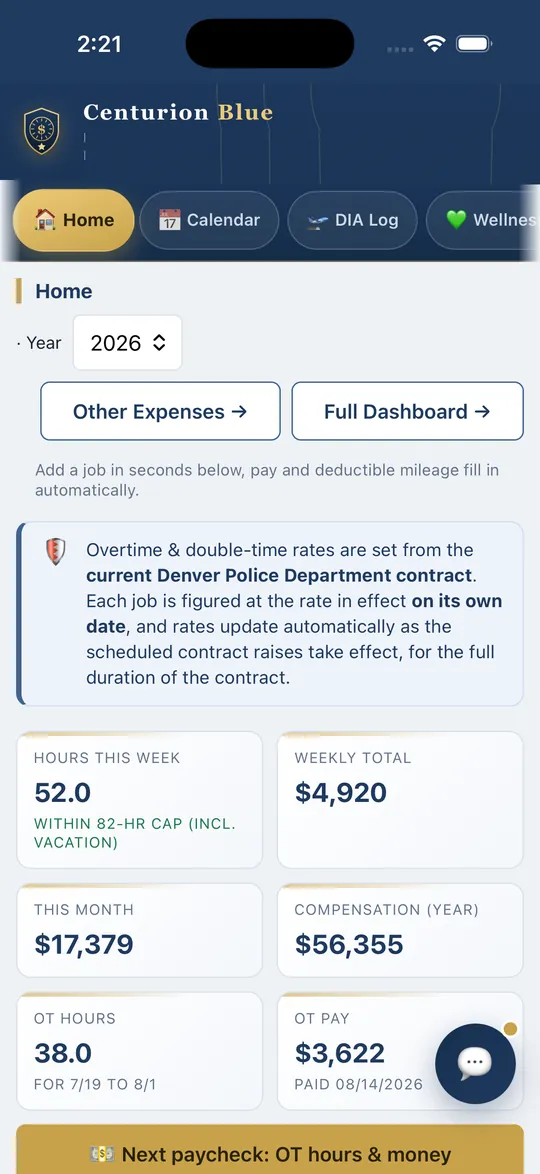
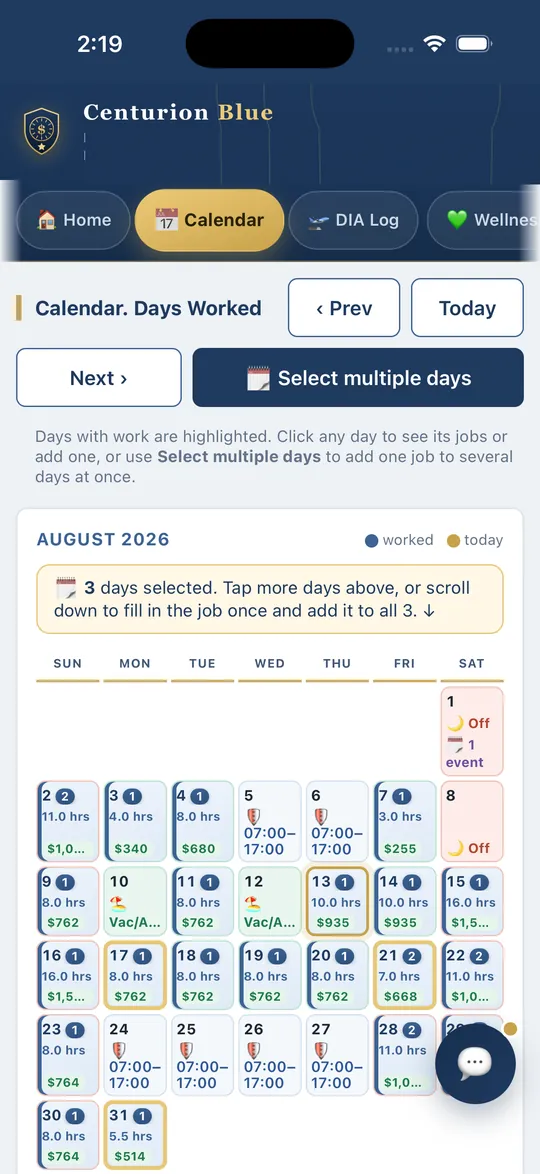
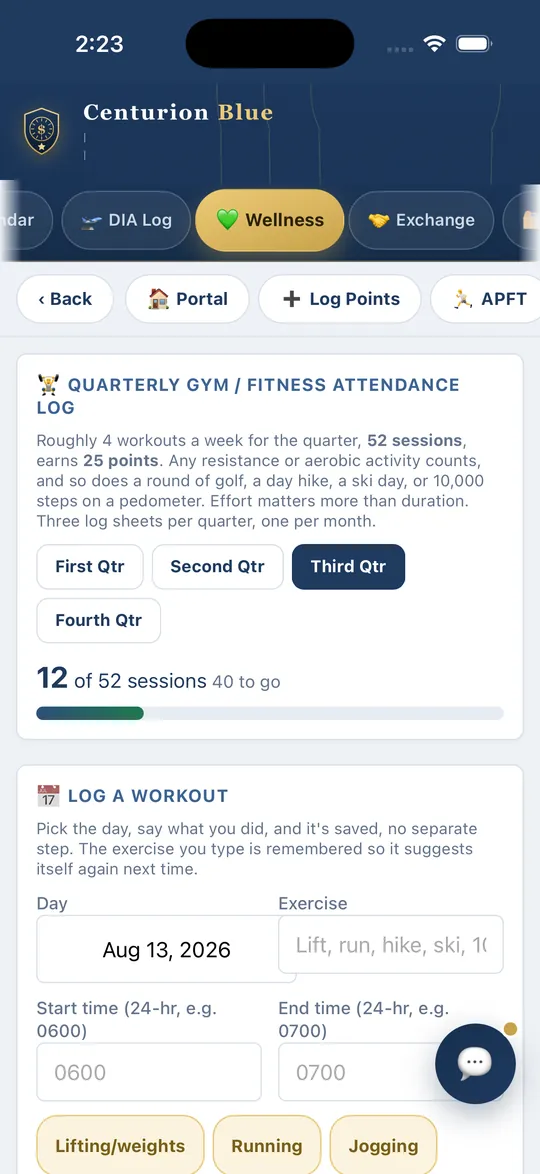
HomeThis week, this month and the year so far, with overtime hours and pay. Premium.CalendarDays off, vacation and regular shift times, with the hours and pay of each job you log.WellnessThe quarterly gym attendance log in the Wellness Portal. On the free Primary plan.
Features
Everything an officer needs to track secondary employment
What Premium adds: off-duty jobs, overtime, mileage, expenses and receipts, tracked and totaled for you.
Pick a date, type the employer, enter your shift times, pay and hours calculate instantly.
Your pay scale built in
Choose your rank & years, base pay loads automatically, and overtime & double time figure from it.
OT, detective & double time
Officer overtime, the 25-year detective rate, and double time, set up the way your department pays.
Mileage at the IRS rate
On 1099 jobs the app measures the drive and values it at the IRS rate in force that day, counted by the rule you choose in Settings. Tracked separately from pay. Record keeping only; ask a tax professional which rule applies to you.
Track every work expense
Uniforms, gear, weapons & ammo, training, phone, recurring charges and totals by category, ready for your tax preparer.
Get-paid reminders
An unpaid-jobs list shows who still owes you and the total. Mark paid when you collect.
Calendar & dashboard
See hours, shift times and pay by day, hours per week, monthly running pay, and multi-year totals.
Add a job to many days
Tap days on the calendar, pick a date range, or repeat a job, enter it once for all of them, then edit the whole entry at once.
📸 AI reads your receipts
Snap a receipt and AI fills in the vendor, date, amount & category automatically, a logged, categorized expense in one tap. Just double-check it.
One-tap Add to Calendar
Send any job to Apple, Google, or Outlook Calendar, with a reminder alert where your calendar supports one, plus in-app and device job reminders.
TeleStaff tracking
Mark whether each job is entered in TeleStaff and see at a glance what's still pending.
Accountant-ready reports
One-click year-end PDF & CSV, income by category, mileage at the IRS rate, and quarterly breakdown.
Phone & desktop, synced
On iPhone and Android from the App Store and Google Play, and in any browser. One account syncs across every device you sign in on.
Match your paystub
Not sure which rank and step to pick? Type the hourly rate or salary from a city paystub and its date, and the app finds the rank and step that pay it. Nothing changes until you tap Use this.
Your shift pattern
8s, a 9/80, 10s, 12s with an 8 every other week, or 12s at 36 hours. Pick yours and the calendar, the shift check, the 16-hour rule and your leave hours follow it.
Call Back & Court Time minimums
Call Back pays its 2 or 3 hour minimum and Court Time its 2 hours (Articles 17.1 and 18.1), or your actual hours when they are more, at time and a half.
Holiday pay
Switch on Contract holidays and the twelve recognised holidays show on your calendar, each with what the day is worth under Articles 11.2 and 11.3.
The 16-hour rule
Turn it on and the app blocks a job that would put you over 16 hours worked in 24 (OMS 114.01(3)k.2). Your weekly cap still only warns.
Calendar invitations
Add people to My Contacts and send an invitation for a job or an event. They need no account, and answer Going, Maybe or Can’t make it from the email.
How it works
Set up once. Then it's seconds a job.
1
Set your rates
Pick your rank and years of service from the department pay scale. Base pay, overtime, and double-time are figured for you.
2
Log each job
Date, employer, shift times. Pay calculates live, and so does mileage on 1099 jobs. Recurring gigs duplicate in one tap.
3
Report at tax time
Open Year End Tax Reports, pick the year, and download a PDF or CSV for your accountant.
Get it on your phone
On the App Store and Google Play
Download Centurion Blue for iPhone, iPad or Android and sign in with the same account you use on the web.
The phone apps add App Lock (Face ID or Touch ID on iPhone, fingerprint or face unlock on Android), home screen widgets and push alerts.
Subscriptions bought on the website are billed through Stripe and can be cancelled from Settings. Subscriptions bought in the iPhone or Android app are billed, cancelled and refunded by Apple or Google through the store. Officers who subscribe at $59.99 keep that rate for as long as the subscription stays active.
Questions
Frequently asked questions
How does the free trial work?
Create an account and you start on Primary, the Denver free plan: the Job Exchange, the Marketplace, My Schedule, My Leave Banks, the Wellness Portal and the DIA log, with no card and nothing that expires. Start your one free 30-day Premium trial whenever you want it, from the box on the registration screen or the gold link at the top of the app. After the trial, Premium is $59.99 a year or $7.99 a month. If you do not subscribe, your account drops back to the free Primary plan and nothing is deleted.
Does it know Denver PD pay rates?
Yes. Pick your rank and years of service and your base hourly rate loads from the published DPD pay scale (July 2026). Overtime (×1.5), double time (×2.0), and the 25-year detective rate are calculated for you, and we update the scale at each new raise, included in your subscription.
Will it sync between my phone and computer?
Yes. Your data is tied to your account, sign in on any phone, tablet, or computer and you'll see the same jobs, expenses, and reports. Centurion Blue is on the App Store and Google Play, and it runs in any browser on your phone or computer.
What do I get at tax time?
With Premium, accountant-ready PDF and CSV reports from Year End Tax Reports: income by category (1099 and W-2), your mileage valued at the IRS rate, a quarterly breakdown, totals by employer, and your expenses by category. A W-2 and 1099 tracker lets you mark each form received. The app does not produce 1099s. It is a record-keeping aid, not tax advice. Confirm specifics with your tax professional.
How does the app count mileage?
Mileage is tracked on 1099 jobs only. The app measures the drive and values it at the IRS rate in force that day: 72.5 cents a mile from January 1 to June 30, 2026, and 76 cents from July 1 to December 31, 2026. You choose the rule in Settings, Mileage deduction rules. With a qualified home office, the round trip from home counts. Without one, the drive from home is left out, and a job you drive to straight from your station counts one way. This is record keeping only. Ask a tax professional which rule applies to you.
What does "No 1099 expected" mean?
A payer that paid you less than $2,000 in the year ($600 before 2026) does not have to send a 1099, so the app shows "No 1099 expected" for that payer. The income is still taxable, and your log is the record of it. You mark forms received in the W-2 Tracker at the bottom of the Log tab, and the Tax Center lists their status. If a 1099 arrives anyway, mark it received.
Can it stop me from double-booking my regular shift?
Yes, optionally. On the Calendar tab, turn on tracking for your days off and vacation, mark your days off, and set your regular shift hours. The app then will not save a job whose times overlap your regular shift, while still allowing work at other times of the day and on vacation, ASL or comp days. No-off-duty days you mark for yourself work differently: the app asks you to confirm, and you can still add the job.
Is this an official Denver Police Department product?
No. Centurion Blue is an independent product, built for DPD officers but not affiliated with, authorized, or endorsed by the Denver Police Department.
Who can see my data?
Your records are stored in your private account, and each user can only read and write their own data. We don't sell your information, and it is never shared with your department. When you take a shift from a scheduler, that scheduler sees what the shift needs, such as your name, and the W-9 you put on file if you switch that scheduler on in Settings, W-9 on File. For extra protection you can turn on optional two-factor authentication in Settings, a 6-digit authenticator code required at sign-in, free for every member.
Free Denver references
Look up your pay, no login needed
Two things every Denver officer ends up hunting for. Both are free to read and open to anyone.